If you've been searching for ways to streamline your training operations, you've probably come across both training management systems (TMS) and learning management systems (LMS). The two terms are often used interchangeably, but they solve completely different problems. And if you choose the wrong one, or try to force one system to do the job of both, you'll pay for it in operational inefficiency, limited scalability, and a frustrating learner experience.
This guide cuts through the confusion. We'll explain exactly what a TMS and LMS each do, how they differ, and help you decide which setup is right for your training business – whether that's one, the other, or both working together.
We’ll also show where learner feedback fits into this ecosystem, and why platforms like Coursecheck are often the missing layer between operational data, learning data, and training quality.
TMS vs LMS: the quick answer
In simple terms, a training management system helps training providers run the business side of training, including scheduling, bookings, payments, resources, and reporting. A learning management system helps organisations deliver and track learning, including eLearning content, assessments, learner progress, and completions. Many training providers use both, with each system handling a different part of the training journey.
The sections below explain the differences in more detail, including when to choose a TMS, when an LMS is enough, and why many training businesses need both systems working together.
What is a training management system (TMS)?
A training management system is the operational and commercial backbone of a training business. It's built to help you run training as a business, not just deliver it.
A TMS typically handles:
- Course scheduling: planning and managing sessions, venues, and resources across weeks or months
- Bookings and registration: real-time availability, online booking, and delegate management
- Payments and invoicing: processing transactions, tracking revenue, and managing financial data
- Instructor-led training logistics: coordinating trainers, rooms, and equipment
- Compliance and certification: automated audit trails, qualification tracking, and certificate generation
Critically, a TMS is designed for training providers who need to manage training at scale – where scheduling complexity, revenue management, and operational accuracy are non-negotiable. The goal is to reduce manual, time-consuming admin so your team can focus on delivering great training. It is not, however, built for content delivery or tracking individual learner progress.
What is a learning management system (LMS)?
A learning management system is designed for learning delivery and experience. Its purpose is to host content, track learner progress, and manage assessments – typically in a digital or blended learning context.
Core LMS capabilities include:
- Hosting eLearning content: SCORM files, videos, quizzes, and interactive modules
- Tracking learner progress: completion rates, scores, and engagement data
- Assessments and certifications: automating assessment marking and issuing digital certificates
- Blended and self-paced learning: supporting on-demand learning alongside live sessions
- Collaboration tools: discussion boards, peer reviews, and social learning features
An LMS is learner-centric. It provides the delivery platform for trackable learning experiences, and in corporate environments typically integrates with wider HR systems, connecting training to appraisals, objectives, and performance management to give a fuller picture of employee development. But it isn't built to handle the business side of training – there's no commercial revenue engine, no scheduling logic for complex instructor-led programmes, and no financial reporting built in.
TMS vs LMS: key differences explained
Here's a side-by-side overview of how the two systems compare across key dimensions:
| Feature | Training management system (TMS) | Learning management system (LMS) |
|---|---|---|
| Purpose | Managing training operations and commercial activities | Delivering and tracking learning journeys |
| Focus | Course scheduling, bookings, payments, instructor and resource management | Hosting and delivering learning content and assessments, and tracking learning journeys |
| Training type | Primarily instructor-led - classroom, virtual, blended | All learning formats, e-learning, blended, self-paced, and instructor-led |
| Users | Training providers, operations teams, finance, admins, trainers | Internal L&D teams, HR departments, employees, admins |
| Revenue handling | Yes – invoicing, payments, pricing models, financial reporting | No – not designed for commercial revenue management |
The simplest way to remember the distinction: a TMS is for running a training operation. An LMS is for managing and delivering learning. Both matter, but for very different reasons.
Do you need a TMS, LMS, or both?
The right answer depends on your delivery model, your audience, and how you generate revenue. Here are the three most common scenarios.
Scenario 1: LMS only
An LMS is the right choice if your primary focus is internal employee training or eLearning-heavy programmes where learning delivery and tracking are the core requirements.
This typically fits:
- In-house L&D teams managing employee onboarding, compliance and skills training
- Organisations where self-paced eLearning is the dominant format
- Teams that don't need to manage external bookings, payments, or commercial scheduling
If you're not running training as a commercial business and don't need to coordinate resources, manage revenue, or schedule instructor-led sessions, an LMS may be all you need.
Scenario 2: TMS only
A TMS is the right choice if you're running a commercial training business where operational complexity is your primary challenge, and where learning content delivery isn't your bottleneck.
This typically fits:
- Commercial training providers selling instructor-led courses to external clients
- Companies where managing bookings, payments, and trainer logistics is the core operational problem
- Businesses that deliver training face-to-face or virtually and need precise scheduling and compliance workflows
- Companies that run large-scale internal training operations
The right setup depends on your delivery model, growth plans, admin complexity, compliance needs, and integration requirements. If you're evaluating which TMS is right for your business, our guide on how to choose a training management system walks through the key criteria in detail. You can also explore the best training management systems for training providers for a comparison of the leading platforms.
Scenario 3: TMS and LMS together
Many scaling training businesses need both. If you deliver blended learning – combining instructor-led sessions with eLearning content – then a TMS and LMS working in tandem gives you the best of both worlds.
This is the right setup if:
- You deliver a mix of classroom, virtual, and self-paced eLearning
- You need to manage commercial operations (bookings, revenue, scheduling) AND track learner progress through digital content
- You're scaling your training operation and need purpose-built tools for each function
When might a training provider also need an LMS?
Training providers typically don't need an LMS, but there is one scenario where it makes sense: when you're hosting and selling digital content directly to client organisations. If your clients' learners need to log in to access content, managers or admins need to control what's available to whom, and you need to track individual learning journeys and completions, an LMS becomes necessary. This is different from running open or bespoke instructor-led training, where a TMS handles everything you need.
When might a corporate L&D team also need a TMS?
In-house L&D teams don't always need a TMS, but at scale, the operational complexity of managing training internally can start to look very similar to running a training business. If your organisation runs large volumes of instructor-led training across multiple departments, each with separate training budgets and scheduling requirements, a TMS can bring the same operational clarity it delivers for external providers.
How training companies use TMS and LMS together: a real-world example
Using both systems together doesn't mean doubling the complexity – it means giving each part of your training operation the right tool for the job.
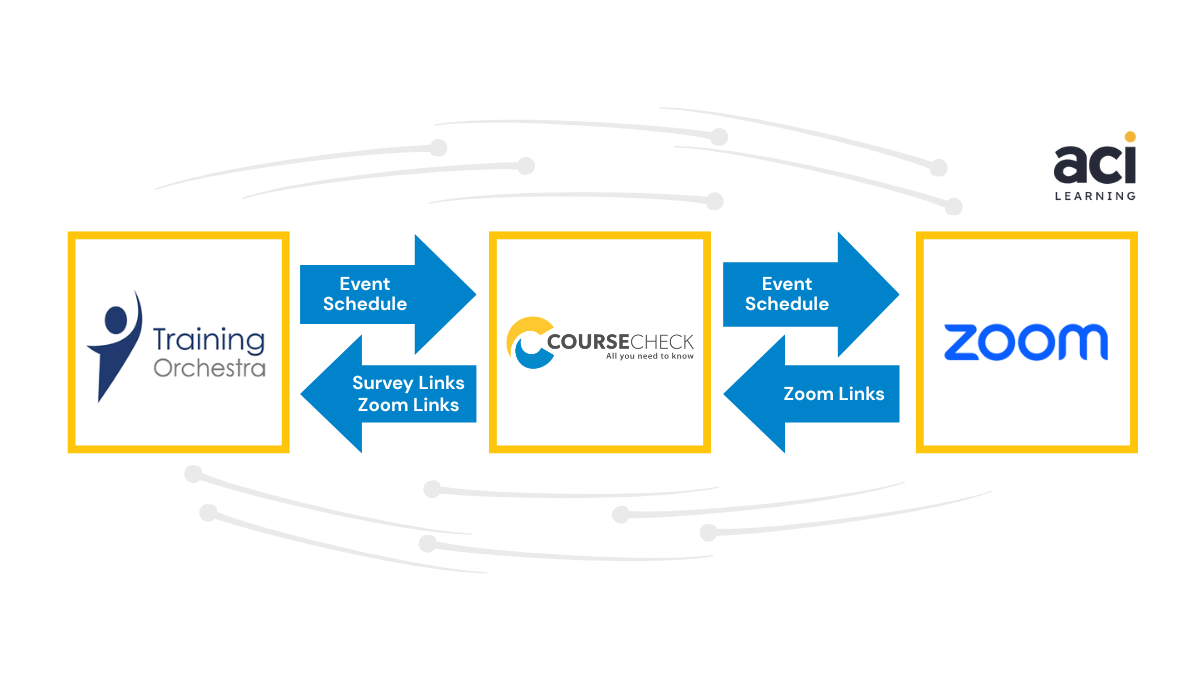
A real-world example of this in action comes from ACI Learning, a leader in cybersecurity, audit, and IT training. ACI Learning runs a fully integrated technology stack:
- Training Orchestra (TMS): handles scheduling, instructor coordination, and operational logistics
- Docebo (LMS): delivers eLearning content and tracks learner progress
- Zoom: hosts virtual instructor-led sessions
- Coursecheck: captures learner feedback and quality data across all courses and instructors
In this setup, each system does what it was built to do. The TMS manages the operational complexity of running courses at scale. The LMS delivers the learning experience. And Coursecheck closes the loop by capturing honest, actionable feedback from learners after every session.
"Coursecheck has been invaluable for getting honest and actionable insights from our learners. It has saved us around 20 hours a week and the support we receive is fantastic."
– Jennifer Strobl, Vice President of Academics, ACI Learning
Critically, Coursecheck is integrated directly with Training Orchestra, Docebo, and Zoom. Evaluation links are generated automatically after each session, updates happen in real time, and the whole process runs without manual intervention. The result: ACI Learning saves around 20 hours per week during peak periods, gets more authentic feedback (because learners aren't handing forms directly to instructors), and can act on performance data weekly, quarterly, and annually.
This is what a modern training stack looks like – not a single platform doing everything adequately, but connected systems each doing their job well.
Where Coursecheck fits across your TMS and LMS
Here's the thing: both TMS and LMS platforms generate data about your training operation, but there's a layer that neither system was built to capture. Feedback.
A TMS gives you operational data: bookings, revenue, and utilisation rates. An LMS gives you learning data: completion rates, scores, and engagement metrics. But neither gives you the one thing that tells you whether your training is actually working – what learners genuinely think about their experience.
That's where Coursecheck comes in.
Coursecheck sits across your entire training operation as the feedback and quality layer, regardless of which platforms you use:
- Works with both TMS and LMS: integrates directly with platforms including Training Orchestra, Arlo, Dante, Accessplanit, Administrate, Docebo, and more
- Automated post-course surveys: evaluation links and QR codes are generated for every session, making it easy to collect feedback
- Real-time reporting: instant visibility of course and instructor performance, with no manual data entry
- Verified learner review: authentic feedback that can be used for quality improvement and marketing
The result is a complete picture of your training quality – operational data from your TMS, learning data from your LMS, and feedback data from Coursecheck – all connected. Learn more about integrating feedback into your training management system and how it supports measuring training impact across your entire operation.
The goal is to reduce manual, time-consuming admin so your team can focus on delivering great training.
Common mistakes when choosing between TMS and LMS
Getting this decision wrong is more common than you'd think. Here are the pitfalls we see most often:
- Assuming an LMS can manage operations. An LMS is brilliant at learning delivery, but it has no commercial engine. If you need to manage bookings, process payments, and coordinate instructors, an LMS alone will leave you managing the gaps in spreadsheets.
- Trying to force a TMS to deliver learning. A TMS handles the operational side superbly, but it's not designed to host eLearning content or deliver self-paced digital learning. Trying to use it as an LMS creates a poor learner experience and limits what you can deliver.
- Choosing based on features, not workflows. Vendor demos can make any platform look capable. The real test is whether the system supports the way your business actually operates, not just the features it can theoretically offer.
- Not considering integrations. A TMS or LMS that can't connect with your other systems creates data silos. Before committing to any platform, map out your full technology stack and check that the integrations you need actually exist and work reliably.
- Overlooking the feedback layer. Many training businesses invest heavily in TMS and LMS platforms, then manually collect learner feedback via paper forms or email surveys. Without a dedicated feedback tool integrated into your stack, you lose the quality and experience data that should be driving your improvement decisions.
- Thinking a CRM can cover everything. A CRM manages relationships and pipelines – it's built to track leads, opportunities, and client interactions. It has no scheduling engine, no learner tracking, and no financial reporting designed for training operations. If you're running bookings or course administration through a CRM, you're likely creating workarounds that will limit you as you scale.
How to choose the right setup for your training business
The scenarios above give you a starting point: an LMS may be enough for digital-first employee training, a TMS is usually better suited to commercial training operations, and many growing training providers need both. But the right setup should ultimately be based on how your training business works today, and how it needs to scale in future.
Before comparing platforms, look at your full training workflow, from course planning and bookings to delivery, feedback, reporting, and follow-up. This will help you identify whether your biggest gaps are operational, learning-related, commercial, or connected to data and integrations.
Key factors to consider include:
- Delivery model: Are you delivering classroom training, virtual sessions, blended programmes, self-paced eLearning, or a mix?
- Scale and growth plans: Will your current setup still work as course volumes, learner numbers, trainers, locations, or client accounts increase?
- Admin complexity: How much manual work goes into bookings, cancellations, trainer allocation, venue management, communications, and reporting?
- Compliance needs: Do you need to manage certificates, qualification expiry dates, audit trails, mandatory training records, or regulated training evidence?
- Integration ecosystem: Which systems need to connect, such as your CRM, finance tools, HR systems, LMS, TMS, video platforms, and feedback tools?
The best setup is rarely the platform with the longest feature list. It is the ecosystem that supports your real workflows, reduces manual admin, connects your data, and gives you the visibility to improve training quality over time.
Final Thoughts
A TMS and an LMS are not competitors. They're complementary systems built to solve different problems in your training operation, and the most effective training businesses treat them that way.
The most successful providers we work with don't just pick one platform and hope it covers everything. They build a connected training ecosystem: a TMS to manage operations and commercial activity, an LMS to deliver and track learning, and a feedback tool like Coursecheck to capture the learner experience data that ties everything together.
The result is a training operation that scales without becoming unmanageable, where every part of the business, from scheduling and revenue to learning quality and instructor performance, is visible, measurable, and improving.
Collect and showcase high-quality learner feedback across your TMS and LMS with Coursecheck.
Frequently asked questions
What is an example of a learning management system, and what are the top LMS systems?
Examples of learning management systems include Docebo, TalentLMS, Litmos, Cornerstone, Kallidus, and Absorb LMS. These are also among the top LMS systems commonly used by organisations.
Each has slightly different strengths – some are better suited to large enterprises, others to smaller training teams or specific industries. The right choice depends on your use case, whether you're focused on eLearning delivery, compliance tracking, blended learning, or integrating with a wider training technology stack, as well as your content format, learner volume, and integration requirements.
Can you use a TMS and LMS together?
Yes – and many training providers do. A TMS manages the operational and commercial side of your training business, while an LMS handles learning delivery and progress tracking. When integrated, they give you end-to-end visibility across your entire operation. Adding a feedback platform like Coursecheck creates a complete picture: operational data, learning data, and experience data all in one connected ecosystem.
How does a training management system improve training operations?
A TMS reduces manual administration by automating course scheduling, delegate management, communications, invoicing, and certificate generation. It gives training providers real-time visibility of bookings, revenue, trainer utilisation, and cancellation rates – replacing spreadsheets and fragmented systems with a single source of truth. For commercial training businesses, this typically translates into fewer admin errors, better resource utilisation, stronger compliance management, and the operational headroom to scale without hiring additional admin resource.